
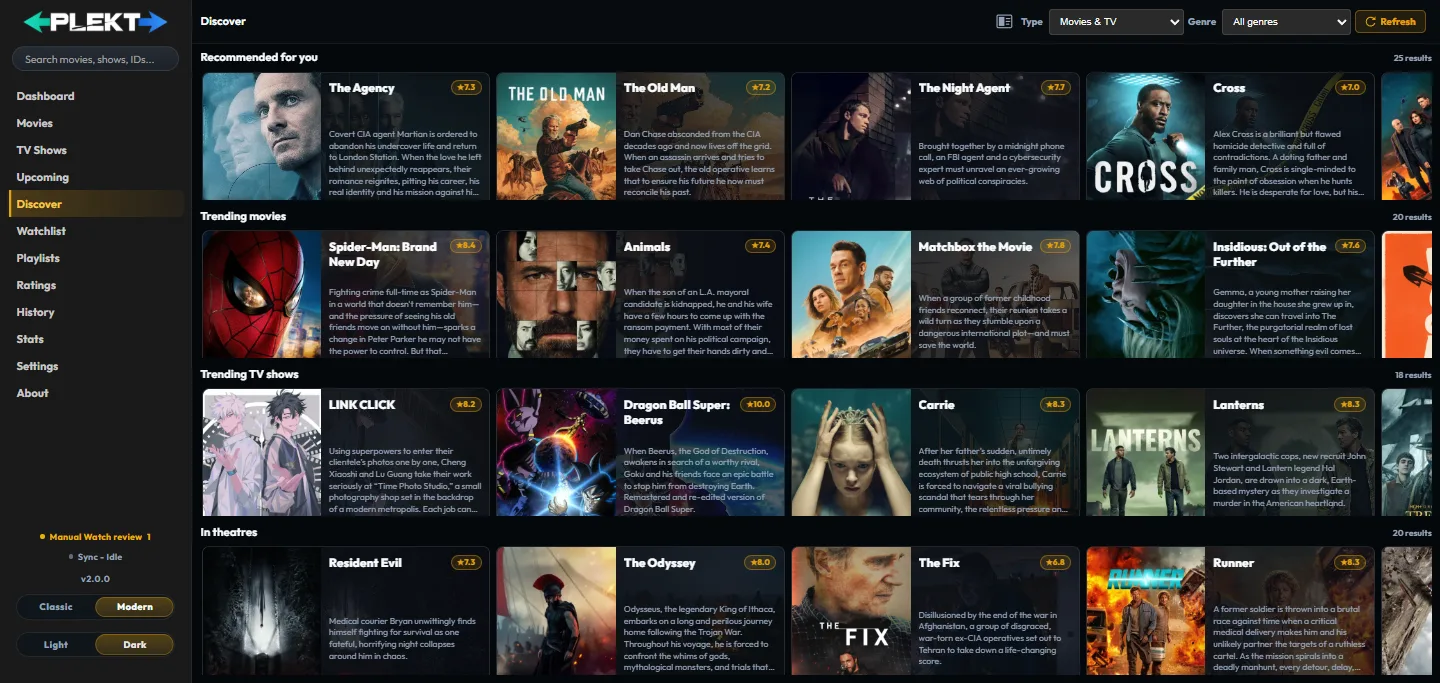
Discover is Plekt’s external-media browsing page. It brings current TMDB feeds into the same poster-card language as the local libraries, so you can explore without first adding a title to a media server.
Discovery rails
The default Movies & TV view can show:
- Recommended for you, based on movies and TV shows watched in the last 12 months;
- Trending movies;
- Trending TV shows;
- Now playing movies; and
- Airing today TV shows.
The exact titles change as TMDB updates its feeds. The page reports the number of results in each rail and uses horizontal scrolling for the poster-card rows.
Discover is a feed, not a second local library. Recommended titles are built from distinct titles watched in the last 12 months and cached per watched title. Titles already in your watch history are removed from every rail, including recommendations. A title can appear here before it exists on one of your connected media servers.
On a recommendation card, open More options and choose Don’t recommend to remove that movie or show from the personalized rail. The choice is saved by Plekt and continues to apply after refreshes and on other browsers. It affects personalized recommendations only; trending, popular, and current-release rails are unchanged.
Type and genre filters
Use Type to switch between:
- Movies & TV for the combined feed;
- Movies for movie rails and movie genres; and
- TV shows for TV rails and TV genres.
The Genre selector changes with the chosen type. Select All genres to return to the default feeds, or choose a genre to request filtered movie or TV rails. Refresh forces a new feed request when you want to recheck the current snapshot.
Discover uses a short-lived local cache so a previously loaded feed can paint quickly while the server revalidates it. A current TMDB API key is required. If the key is missing or TMDB is temporarily unavailable, the page presents an actionable Settings → Metadata link or a retry button instead of silently showing stale empty rails.
If there is not enough watch history to build recommendations, the page explains that the personalized rail will appear after you watch a few titles. The other discovery rails remain available.
Open and save a title
Select a card poster or title to open the standard movie or TV detail page. Cards also keep the common More options action available.
From a Discover card or detail page you can:
- add a movie or show to Watchlist;
- choose a personal Rating from 1 to 10;
- add the title to a Playlist; and
- choose Don’t recommend to exclude it from the personalized recommendation rail.
Those actions are private local choices. They do not create a watched event, alter the canonical provider match, or imply that a title is available in one of your libraries. Use the detail page’s Available on and Watch Now information to decide where a title can actually be played.
For the pages that hold these choices, use the dedicated Watchlist, Ratings, and Playlists pages for the private workflows.