
Plekt steps checked against v1.3.1 on 2 October 2026.
When a film or episode is watched on one server but stays unwatched, or keeps the wrong resume position elsewhere, trace one event before changing anything. Repeatedly toggling watched state can make it harder to tell which service has the latest value.
Trace one title
- Choose one film or episode and one direction, such as Plex to Jellyfin. Note the source, destination, title, year or episode, and approximate event time.
- Open the source service and confirm that it recorded the watched state or playback position. If the source is wrong, fix playback reporting there first.
- Confirm how the source reaches Plekt. Plex uses its built-in WebSocket notifications plus scheduled checks. Jellyfin uses its Webhooks plugin plus polling. Follow the Jellyfin webhook setup when Jellyfin is the source.
- Confirm Plekt is connected to the intended server and account. The Plekt host must be able to reach the server URL; a connection that works in your browser does not prove that the host can reach it.
- Check that the destination contains the same title. Compare the year, season, episode number, and provider identity before correcting a match. Duplicate titles and differently matched episodes can look like failed syncs.
Read the destination result
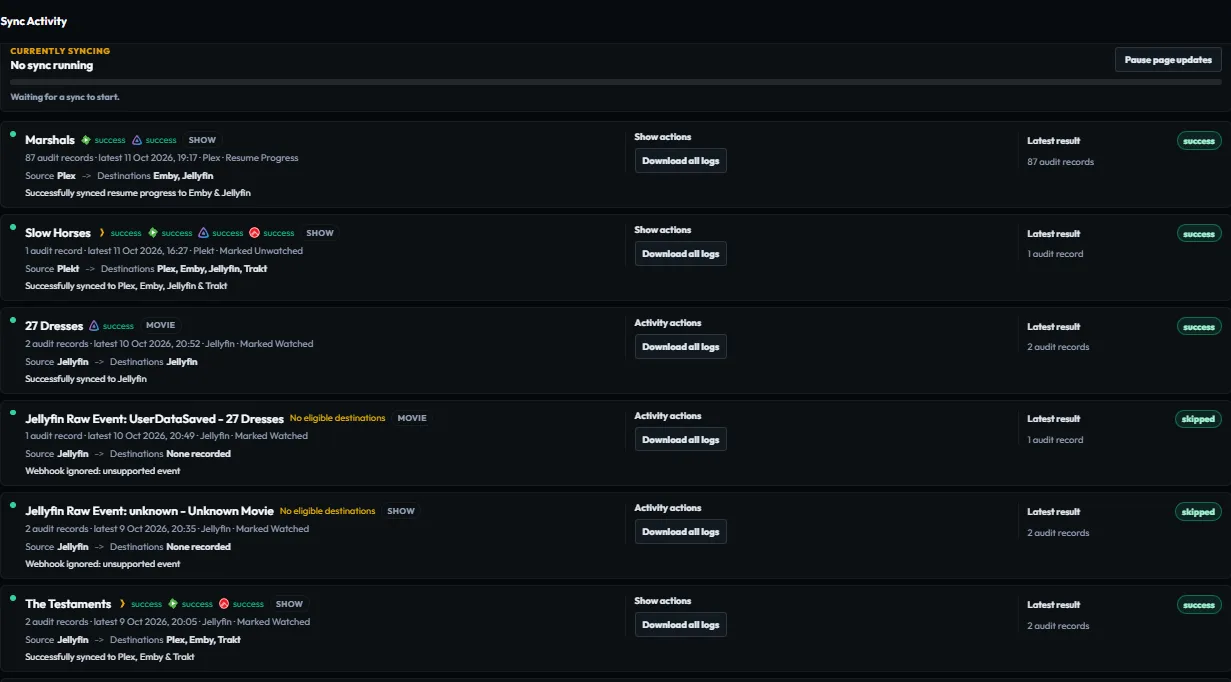
Open Sync Activity, find the newest event for the title, and expand its group. Check each destination’s result and reason:
- Skipped often means no matching item was found, the destination is not configured, or the item was outside the operation’s scope.
- Failed means the provider request did not complete. Check Settings → Logs for the provider detail.
- Success means Plekt recorded a successful delivery response. Confirm the resulting state in the destination service too.
Correct the cause shown in the row. If a retry is available, retry only the affected item or destination, then confirm that its result updates. Avoid a library-wide replay for a single mismatch.
If it still disagrees
Make a backup before changing credentials, resetting history, or restoring data. Keep the event time and non-secret error text for a support report. Do not post API keys, webhook tokens, private library names, or account identifiers.
Plekt can show and retry its own provider deliveries. It cannot repair a provider-side outage or guarantee a match for every title. See the Plex integration guide, Jellyfin integration guide, and Sync Activity guide.