
Manual Watch review is the decision queue for watch events that do not have a reliable completion time. It keeps Plekt from assigning an invented date and gives you a focused place to confirm, correct, or dismiss the event.
How the review queue works
Enable Require review in Settings → Sync → Sync tuning. When Plex, Emby, or Jellyfin reports a provider-side watched flag without enough timing information, Plekt keeps the event pending and shows Manual Watch review in the sidebar. This includes an item that Plekt currently considers unwatched: the provider event is held for a decision instead of being silently rejected or sent on to the other media servers. The link is shown while there are decisions to make, including when a new item is flagged after you already decided an earlier review.
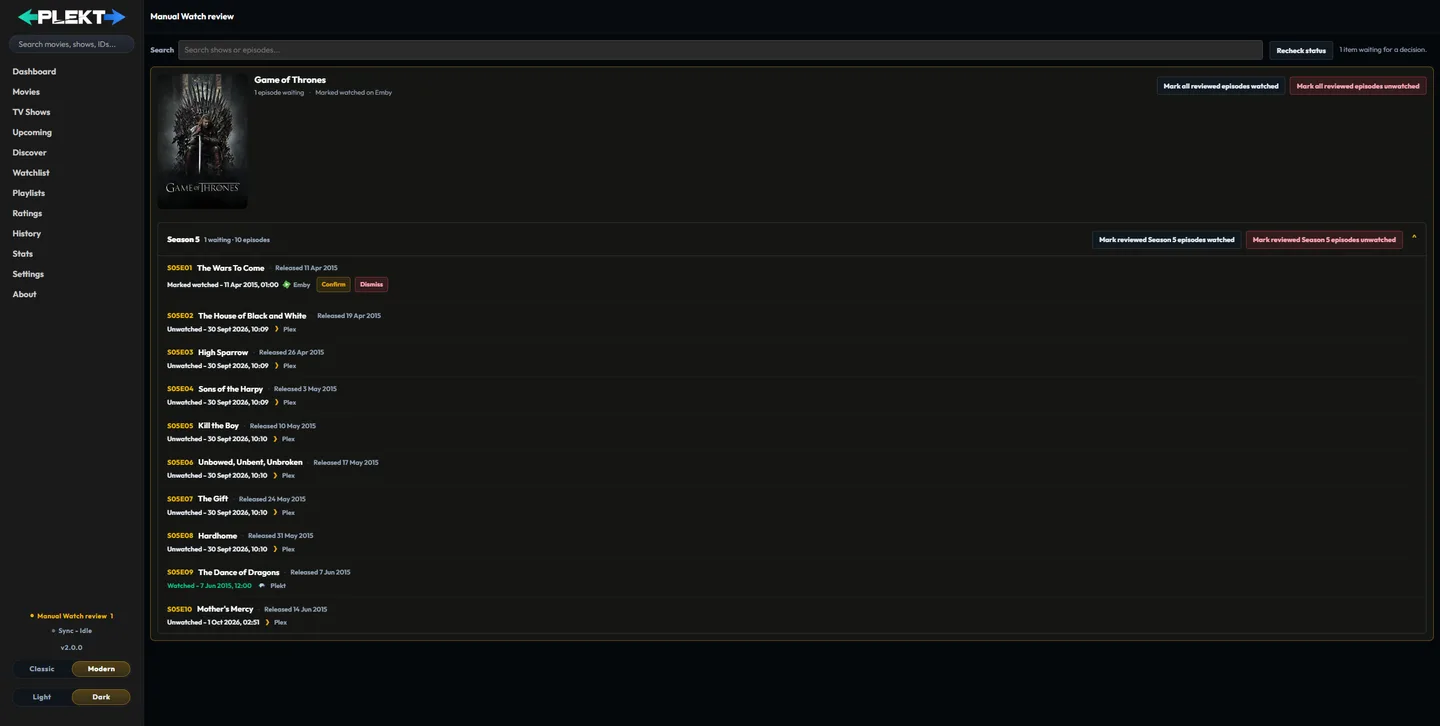
Episode reviews are grouped by show, while movies appear as individual items. Use the search field to narrow the queue, then open a show group when you want to process its episodes together.
Choose a watch date
For a movie or a single episode, choose the date policy that matches what happened:
- Mark watched now records the current date and time.
- Use release day uses the movie or episode release date.
- Use episode timing uses nearby episode dates when that context is available.
- Choose date & time records a specific custom date.
Each season and show group has one watched and one unwatched button, such as Mark all reviewed episodes watched and Mark all reviewed episodes unwatched. The watched button opens the same date popup as the media page’s season and show actions, and the unwatched button uses the same unwatch confirmation. Only the episodes waiting for review change; other episodes of the season or show keep their state. Review the resulting date before confirming it.
Each review names the show its provider ids prove, and shows no poster rather than the wrong show’s. A review without provider ids is looked up through the reporting app and stays pending instead of guessing when two shows share the title. The sidebar count matches the page.
Correct provider state
Choose Confirm to record the watch in Plekt and send the normal watched-state correction to the connected providers. Until that decision, Plekt does not propagate the provider’s watched flag. Choose Dismiss & mark unwatched when the provider event was wrong; Plekt clears the local review and corrects the provider state before closing the item.
Use the show-level buttons when every pending episode in a group should receive the same decision. If a provider correction fails, the review remains pending so it can be retried. An explicit unwatch clears an existing review, while a later deliberate provider event can create a new one.
Recheck status
Use Recheck status when a watch was already handled in another client or the queue looks stale. Plekt rereads its canonical watch state and the pending review queue, then removes items that are already marked watched in Plekt. This keeps provider leftovers from appearing as decisions that still need action. Library imports also skip items that are already watched, and pending reviews that local state already answers are closed automatically.
For delivery outcomes and targeted retries, see Sync Activity. For the policy and timing controls that feed this queue, see Settings → Sync.